Meet your AI assistant.

A private assistant built for Coldwell Banker Sea Coast Advantage and Coldwell Banker Advantage agents. It writes in your voice, watches your deadlines, and knows your market.

What this is

A personal AI assistant that lives in your browser, trained on your profile, your transactions, and your market.

Private by design
This is not ChatGPT with a logo on it. The AI runs on private servers, and it only knows what we have put into it. More on that below.
Built for your workflow
Designed around how CBA agents actually run listings and buyers, from the first seller call through closing, not a generic chatbot.
Learns how you work
Tell it once how you sound and how you sign off, and every draft comes back that way. The more you use it, the closer the fit.

Where it runs, and why that matters

Most AI tools send whatever you type to a public service like ChatGPT or Gemini, and answer from whatever they scraped off the internet. This one does neither. That difference is the whole point.

It runs on private servers
The model answering you is installed on our own hardware, not rented from a public AI company. Your question is answered on that machine and goes nowhere else.
Your documents stay put
Contracts you upload, conversations you have, and the brokerage material the assistant reads all live on that same private server. They are not copied to a third party.
Nothing trains a public model
Nothing you type is used to train anyone's AI. Your listing strategy, your client's situation, and your commission conversations do not end up improving a product the rest of the industry uses.
You decide what the team sees
Your conversations, contracts and drafts are private to you, and no other agent can reach them through their own assistant. Anything the team does see, like an item on the market intel page, is there because someone chose to put it there.
It answers from what we put in it
Its knowledge is the material loaded into it: the brokerage's documents and forms, state law and the standard forms, your listings, your transactions. It is not answering from whatever it read on the internet, which is why it can tell you where an answer came from.
It cannot wander off on its own
It can look something up outside when that is switched on, and whether it is switched on is an administrator's decision, not the assistant's. Everything else it touches is something you connected yourself, like your mailbox, your calendar or dotloop.
What it does

Writes in your voice
Client emails, texts and social posts that sound like you wrote them.
Watches your deadlines
Drop in a signed offer and every date lands on your calendar under the property address, with reminders before anything comes due.
Finds listings
Ask in plain English or filter on the Market Data page. Full detail and photos on any listing.
Launches your listing
The Just Listed post, open house invite, price improvement, buyer email and a printable flyer. Give it a go-live date and it schedules the whole prep backwards onto your calendar.
Keeps the team current
Rates, housing and local news summarized on one page. Forward anything in, send anything on to a client.
Runs the routine
Checklists for listing setup, onboarding and floor duty, plus rules that run on their own so you stop doing the same three things every time.
Knows the paperwork
Ask about a form or a policy and the answer comes back with the document it came from.
Works with your email and calendar
Google or Outlook, so drafts send from your real address and dates land on your real calendar. Search your inbox, catch up on a thread, add Zoom links as it schedules.
Answers the phone
Call it and talk to it, for when you are between showings and typing is not an option.
See everything it can do The full guide runs to 26 sections and covers every feature in detail, with example questions you can copy straight into the chat.

What it looks like

Two answers, exactly as they come back in the chat.

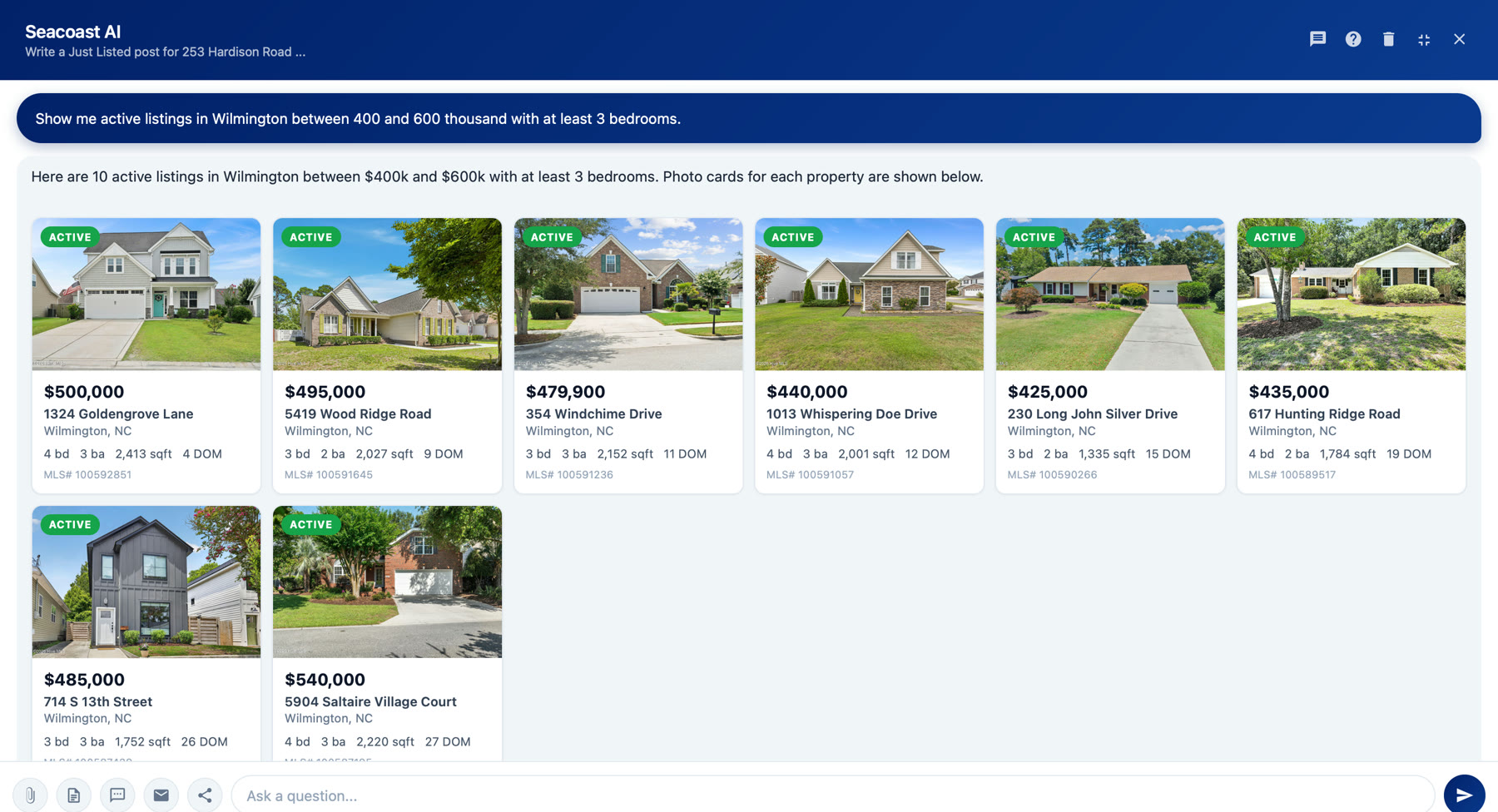
YOU ASKShow me active listings in Wilmington between 400 and 600 thousand with at least 3 bedrooms.
The assistant answering with photo cards for eight Wilmington listings, each showing price, address, beds, baths, square footage, days on market and MLS number.
Ask in plain English and the listings come back in the chat, with the photo, price, beds, baths, square footage, days on market and MLS number. No filters to set, no separate search screen. Click any card for the full detail.
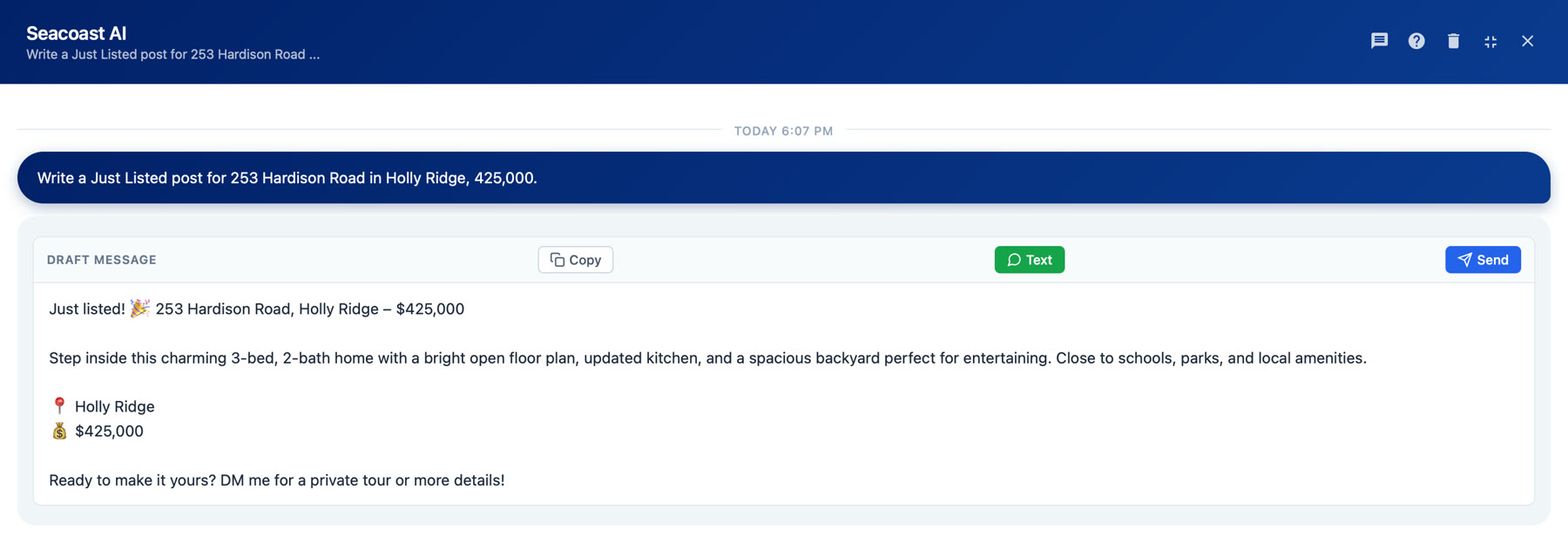
YOU ASKWrite a Just Listed post for 253 Hardison Road in Holly Ridge, 425,000.
The assistant returning a finished Just Listed social post with Copy, Text and Send buttons above it.
Anything it writes for you arrives ready to use, with Copy, Text and Send sitting on top of it. Text hands it to your phone so it goes out from your own number.
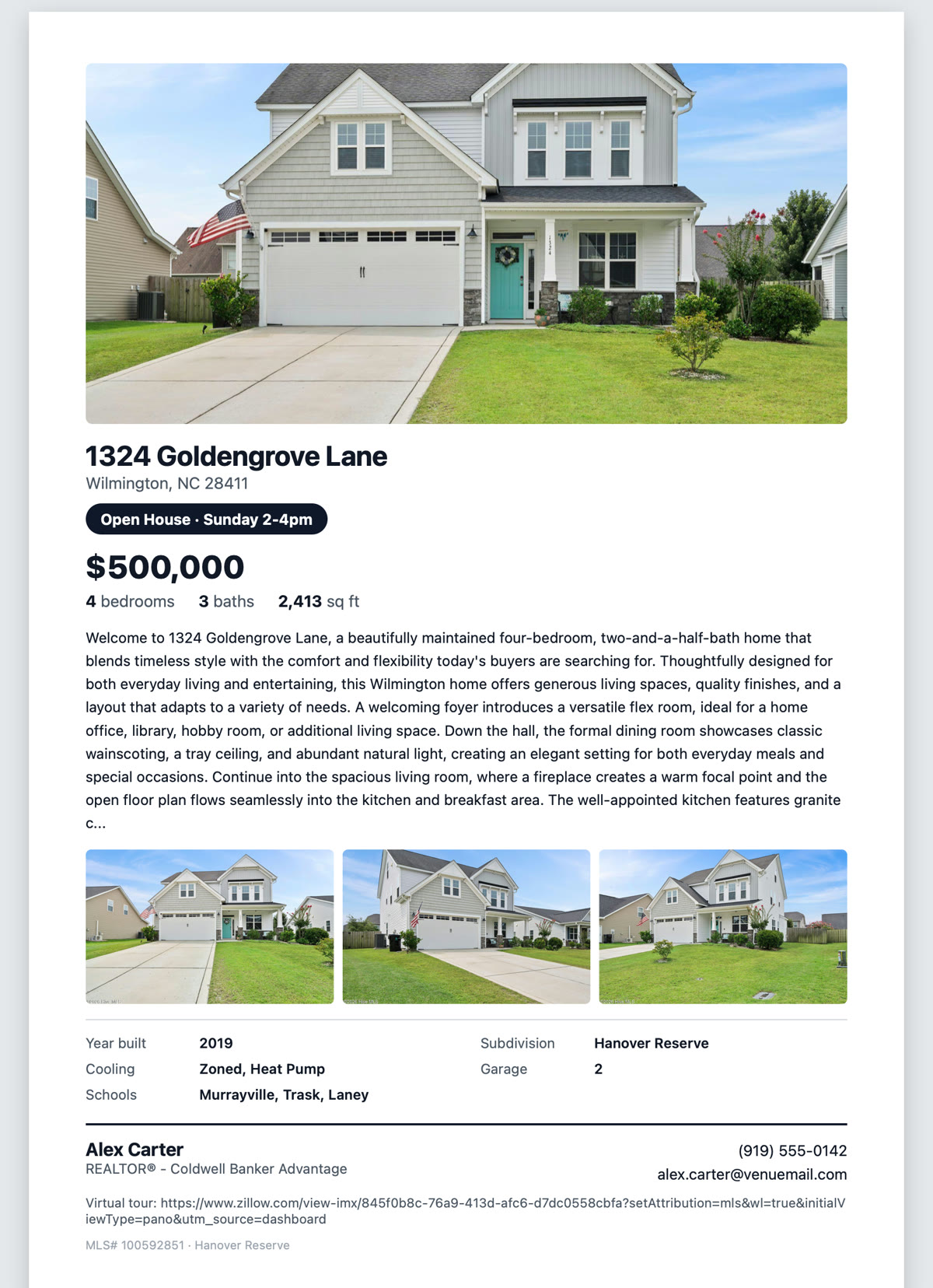
YOU ASKMake me a flyer for 1324 Goldengrove Lane, open house Sunday 2-4pm.
A printable one-page listing flyer showing the property photo, address, open house line, price, bed and bath counts, a written description, three more photos, property details and the agent's own name, phone and email at the foot.
A finished one-page flyer, written and laid out for you, with your own name and number at the bottom. Print it for the open house or save it as a PDF to email or text. Leave the open house off and you get a standard listing flyer instead.
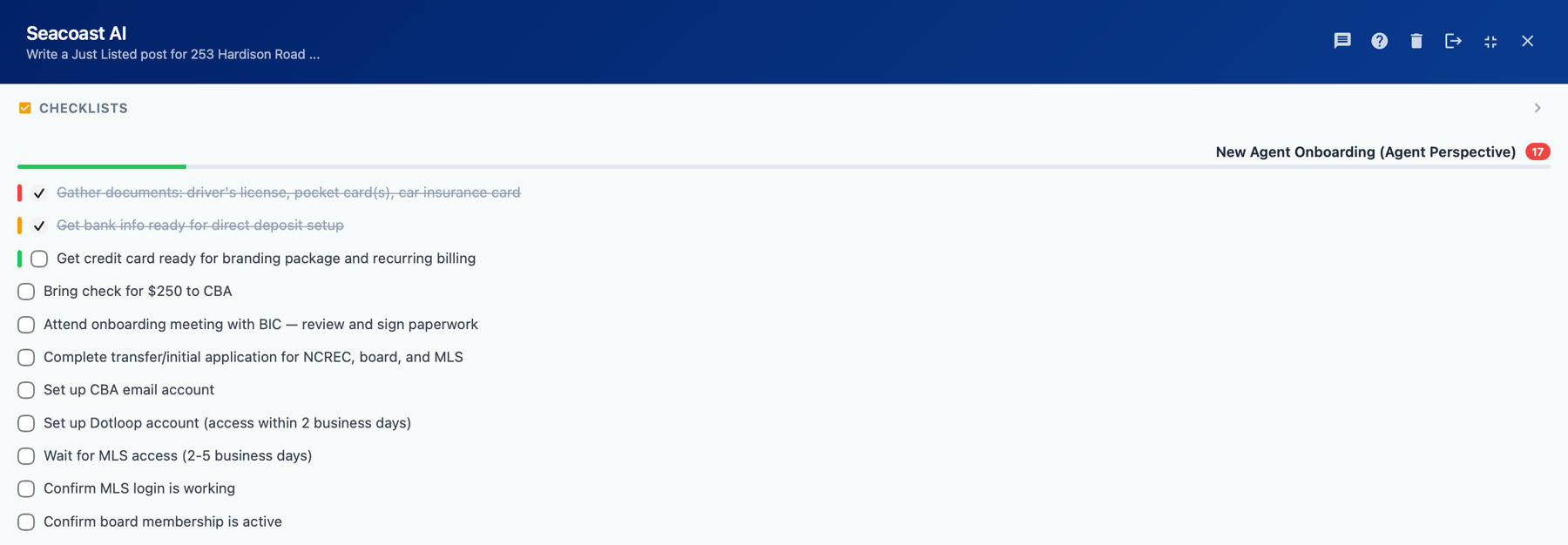
YOU ASKStart my New Agent Onboarding checklist.
The checklist panel at the top of the chat showing the New Agent Onboarding checklist expanded, with items such as gathering documents, setting up the CBA email account and confirming MLS access, two of them already ticked off.
Checklists live at the top of the chat, so the list is in front of you while you work rather than in a drawer somewhere. Tick items as you go and it remembers where you got to. There are checklists for listing setup and floor duty too.

Getting started takes ten minutes

Watch for your welcome email

You'll receive a personal login link and temporary password by email. Check spam if you don't see it.

Sign in and look around

It works on your laptop, tablet, or phone, anywhere you have a browser. No app to install.

Fill out your Digital Twin

Five minutes in Settings: how you sign off, how formal you are, your service areas. This is how the assistant learns to sound like you.

Connect email and calendar

One click for Google or Outlook. This lets drafts send from your address and deadlines appear on your calendar.

Try these in your first week

Draft a price-improvement email to my sellers at 412 Oakwood. Keep it encouraging.
drafts it in your voice
Here's the signed offer. What are my deadlines? (with the PDF attached)
extracts & schedules dates
What's happening in the market this week?
sourced market briefing
Write a just-listed Instagram post for my new Apex listing, 4 bed, 3 bath, cul-de-sac.
social copy, your tone
118 Maple goes live on the 22nd. Schedule the prep.
books the whole run-up
Show me active listings in Apex over 2,400 square feet.
filtered listing search
Text that draft to my phone so I can send it.
hands it to your messages
Email me a reminder three days before every due diligence deadline.
standing automation

There's no wrong question. Ask the way you'd ask a colleague, in plain English.

Getting the most out of it

Use it on real work

Real listings, real buyers, real contracts. It is far more useful on the real thing than on a trial run.

Ask for what is missing

If it cannot do something you need, say so in the chat. That is how the next thing gets built.

It keeps getting better

New features arrive continuously. Nothing to install and nothing to update, it is there next time you sign in.

Everything else it can do This page is the short version. The full guide has all 26 sections, with examples for each.